

Students can view their billing statements in the Student Accounts section of UNCGenie. Billing statements represent a snapshot in time and are only as up-to-date as the last time they were issued. Students are advised to check their actual account balance (also in their Student Accounts) for the most recent total amount owed.
The student bill includes a number of different charges – not just tuition – so it’s important to understand what all charges mean.
EXAMPLE BILLING STATEMENT
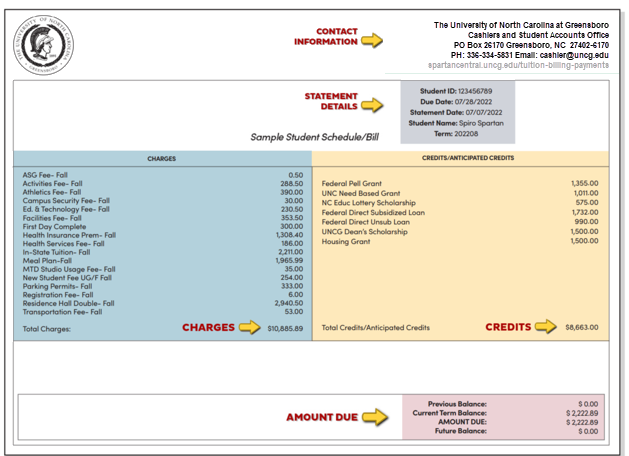
Contact Information and Statement Details
Students should confirm the accuracy of the information listed on their billing statement. Please use the UNCG Spartan Central Contact Form to inquire about financial aid and scholarships, housing and meal charges, residency determination, health insurance, parking, student account balances, or other items listed on your bill.
Charges
The left column of the billing statement is a running list of all account charges in alphabetical order. Student bills may include charges for:
Tuition and mandatory fees
Students should check that they are being charged at the appropriate residency rate (in-state vs. out-of-state). Visit the tuition and fees section for information about residency and explanation of required fees.
Student health insurance (students must opt out of this charge each year)
A required health insurance charge will appear on the bill unless the student waives the automatic student coverage in order to use their own private insurance plan. If a waiver isn’t filed within the first 1-2 weeks of the semester, the health insurance fee cannot be refunded.
The UNC system requires health insurance coverage for degree-seeking students registered for more than 6 credit hours on campus. Students may use their own private coverage (or coverage through their parent or guardian), or they may use the University’s insurance plan through Student Blue. To ensure the UNC system requirement is met, all affected students are automatically enrolled in the Student Blue plan until they confirm they prefer to use their own private coverage. Students with alternate insurance must waive the Student Blue coverage in order to avoid charges for student health insurance coverage. If a waiver isn’t filed within the first 1-2 weeks of the semester, the health insurance fee cannot be refunded.
Housing costs
Housing fees vary depending on the semester, residence hall, and room type. More information about housing options and costs is available through Housing & Residence Life.
Meal plan
First year students living on campus must have a meal plan. Upper level students and commuters do not have a requirement, but can take advantage of a variety of options. Students can choose a plan that includes Flex Dollars that can be used at participating local restaurants, many of which offer delivery to campus. Visit the Campus Dining site for information about meal plans.
Parking pass
Students purchase parking decals directly through Parking Operations. Decals are priced according to parking lot/deck locations and range in price. Details and purchase options are on the parking website.
First Day Complete
UNCG First Day® Complete is a course materials delivery program (rental) that lowers the cost of course materials and ensures students have their required course materials on the first day of class. Students will receive a course charge on their student bill that says UNCG First Day Complete. The charge is based on the number of credit hours per term. The rate is $19.00 per credit hour. So, if you are taking 15 credit hours, your UNCG First Day Complete charge would be $285.00 for all required course materials. Learn more on the Bookstore Website.
Past balances from previous semesters
During the semester, students may incur new charges for a variety of reasons. It is the student’s responsibility to monitor their account and pay for these charges in a timely manner. Large outstanding balances may result in a registration hold, but smaller outstanding balances may end up being rolled into the next billing cycle. Up-to-date balances and account information can be viewed online on the Student Account Center website.
Credits
The right column of the billing statement reflects financial aid and other awards that will help offset the cost of attendance. Unlike tuition and fees, which are billed per semester, financial aid is awarded annually. Keep in mind that loans are subject to an origination fee, so their amounts here will differ slightly from official financial aid award documents.
If the expected aid amounts are not reflected on the billing statement, check to be sure that all required paperwork is complete and has been submitted and aid has been officially accepted through UNCGenie. Financial aid is credited to the student account only after these two steps have been completed. For additional help, contact the Office of Financial Aid and Scholarships at finaid@uncg.edu or 336.334.5702.
Amount due
The amount owed is the difference between charges and credits. (Current students may also see previous and future balance amounts reflected here.)
If credits outweigh charges, you may be due a refund after financial aid is disbursed. Visit the section about refunds for more information about how to set up direct deposit for the fastest access to your refund amount.
There are payment plans available to any student who needs assistance paying the balance of their bill.
VIEW AN ON DEMAND STATEMENT
You can access a real-time on demand statement at any time using the ‘View On Demand Statement’ button on the home page of the Student Account Center.
This statement provides student charges, payments, balances, and courses for a selected term in real time. It can be used when an official transcript is not required, but the student must submit an itemized statement of billing or coursework to an employer or sponsor. (Note: Only students can view their coursework for a term).
HOW TO GENERATE AN ON DEMAND STATEMENT
- Open the Student Account Center online.
- Students: Log in to the Student Account Center at: go.uncg.edu/studentaccountcenter. If prompted, enter your UNCG iSpartan email address and password.
- Former students: Log into the Student Account Center with your 9-dgit Student ID number and 6-digit PIN at: go.uncg.edu/studentaccount-authorizedusers
- Authorized Users: Log in with the email and password associated with your authorized user account at: go.uncg.edu/studentaccount-authorized users
- Click the “View On Demand Statement” button in the “Statements” box of the home screen of the Student Account Center.
- Select the term of the statement you would like to view from the drop-down menu.
- Click on the Submit button.
- The statement will open in a new window, scroll to the bottom and select “Print” to print the statement or save as PDF.